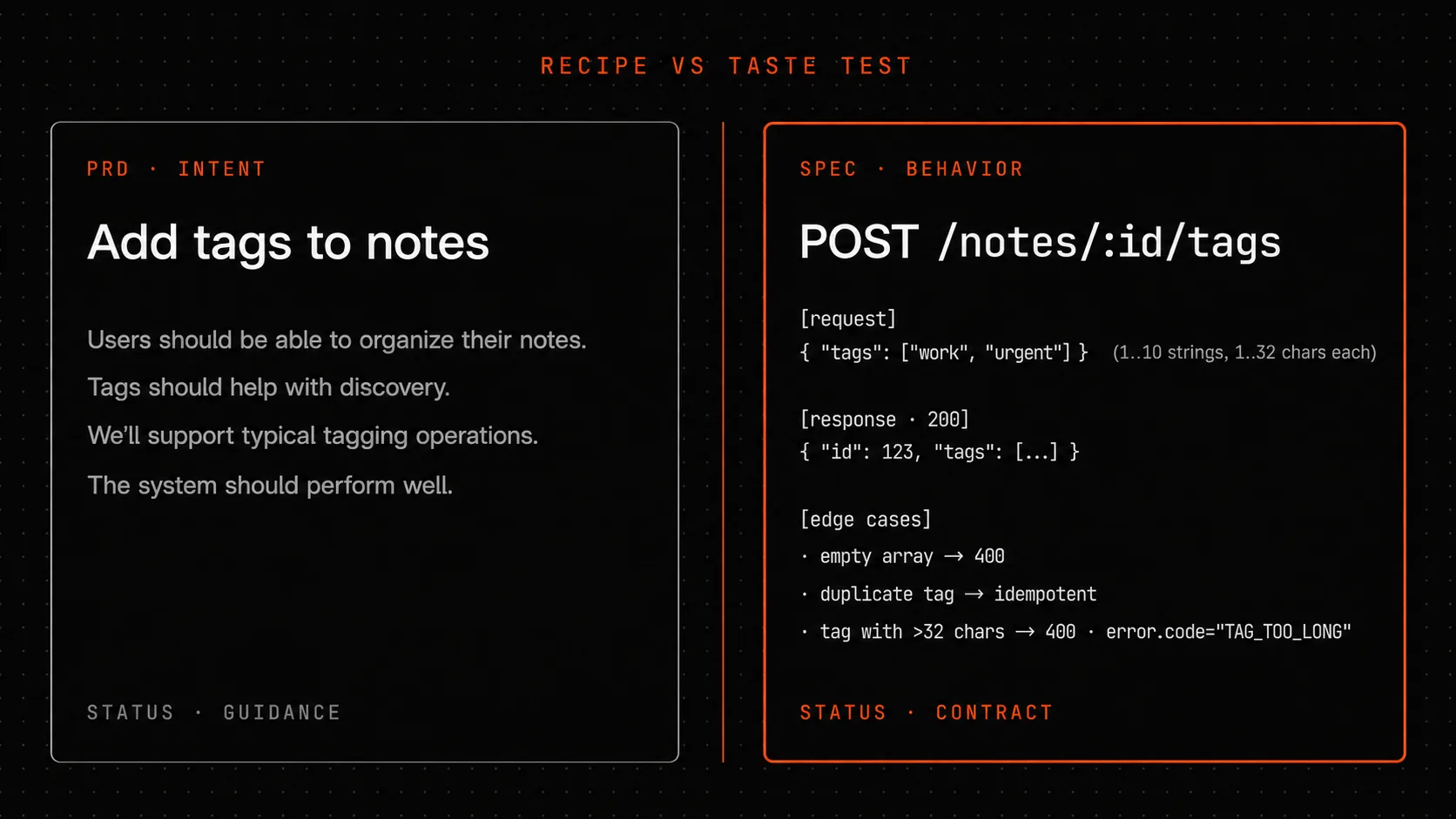
A recipe can sound delicious and still be unworkable. The final taste of a dish is only verified by eating it. A PRD is the recipe. A Specification is the taste test: verifiable system behavior, a delta format for changes like commit messages, a dependency graph between related specs.
The symptom: “we followed the doc, but the user says it doesn’t work”
A developer walks into a discussion with the project manager and says: “The feature is done - everything in the PRD is covered.” The manager nods, opens the app, tries it - and a minute later frowns: “But that’s not what we wanted.”
Who’s right?
On one side, the developer. They built exactly what was written in the PRD. If anyone had gone through each requirement line by line - every one is satisfied.
On the other, the manager. The final product feels different from how it was supposed to. Somewhere between “requirement” and “implementation” a shift occurred, and both sides missed it, because both were looking at different documents.
I’ve seen this situation in a dozen teams. It almost always has one root cause: the Product Requirements Document (PRD) says what we want, not how the system should behave. These two things sound similar, but the difference is enormous. I want to unpack it through examples, show a spec format that closes the gap, and explain why a dependency graph between specifications works a lot like commit messages in a repository.
Intent and behavior
A PRD speaks the language of intent. “Add tags to notes.” “Make search faster.” “Let the user undo an action.” This is useful as a compass - everyone on the team understands the goal.
But “add tags to notes” is not a description of system behavior. It’s a description of what the user should end up with. Exactly how tags are added, what happens for different inputs, where the boundary between normal behavior and an error sits - the PRD doesn’t answer any of that.
A Specification does.
Compare two phrasings. PRD: “Add tags to notes.” Spec: “The endpoint POST /notes/:id/tags accepts an array of strings between 1 and 10 elements, each string 1 to 32 characters long. Returns 200 and the updated tag array for the note. An empty array returns 400 with the message ‘tags array cannot be empty’. If any string exceeds 32 characters - 400 with ‘tag exceeds max length 32’. Duplicates in the array are silently deduplicated.”
PRD - three words. Spec - three paragraphs. But those three paragraphs are exactly what separates “the developer guessed what the manager wanted” from “the developer has a contract.”
A developer working from PRD-only builds an implementation based on their own judgment. They might allow an empty array, reasoning that it “means remove all tags.” Or allow any string length, forgetting that the database column is capped at 64 characters. Or not think about duplicates at all. Each of those decisions will later surface as “but that’s not what we wanted.”
With a spec - no such surprises. If it was written before the code, the developer isn’t guessing - they’re implementing. If it was written after - it becomes a test: the implementation either passes the contract or it doesn’t.
The “out of scope” section is mandatory
The most important section in a Specification is the one that almost never appears in a PRD. That’s the explicit statement of what is not in scope for this spec.
Example. The spec for the endpoint POST /notes/:id/tags explicitly states:
- Out of scope: renaming existing tags (separate spec for the PATCH operation).
- Out of scope: deleting a tag from all notes at once (separate spec for an admin operation).
- Out of scope: searching notes by tag (separate spec for a GET operation on the collection).
- Out of scope: tag colors and hierarchy (not supported in the current version).
Those four lines do two things. First - they fix the boundary: the developer knows the code needs to solve exactly this problem and no more. Second - they point to adjacent specs that together form the complete tag system.
Without an “out of scope” section, specs tend to sprawl. Two weeks later someone appends “also need to rename tags,” a month later “also delete a tag everywhere.” After a quarter, you have one giant forty-page spec that nobody reads. With “out of scope,” each spec stays responsible for one behavioral boundary, and neighboring specs exist separately, connected through the graph.
Delta format for requirements
When a spec changes, you can record the change in two ways.
First - rewrite the spec from scratch. Delete the old version, write a new one. This is how teams treat requirements as free-form text in a wiki.
Second - record the change as a delta: what was added, what was modified (with a clear “was / now” split), what was removed (and why). This is how teams treat requirements like code in a repository.
The delta format is borrowed from git diff. A spec change is described as a set of operations:
- ADDED - what appeared. A new requirement, a new endpoint, a new constraint.
- MODIFIED - what changed. With the split: “the behavior was X, now it’s Y.” Without the split, it’s unclear what exactly shifted.
- REMOVED - what was dropped. Always with a reason: “removed the minimum tag length requirement because we added support for emoji tags.”
This format gives you two things. First - a requirement history you can read the same way you’d read commit messages in a code repository. “When did we add that constraint? Why?” Open the delta, see the date and reason. Second - a way for adjacent teams to learn about a meaningful change without re-reading the entire spec.
In a team that uses the delta format, changing a spec becomes as disciplined an act as changing a public API: you can’t just rewrite, you have to explain what and why.
The dependency graph between specifications
Specs rarely exist in isolation. The spec for POST /notes/:id/tags depends on the spec for the notes database schema (because tags are stored there) and on the spec for common API error formats (because 400 responses need to follow a shared format). In turn, it’s depended on by the spec for searching notes by tag (it uses the same data model) and the spec for migrating old notes (it needs to correctly handle notes without tags).
If you have ten specs - they have dozens of such links. If you have a hundred - thousands.
Without a dependency graph, changing one spec triggers an invisible chain reaction. Today you change the tag storage schema - and two weeks later someone notices that the search spec was relying on the old schema. Another month later, the migration spec has the same issue. The team catches these discrepancies as they surface in the product.
With a dependency graph - a spec change automatically opens up linked specs for review. You change the schema, and the system says “you should check the search and migration specs - they depended on the old schema.” The team looks in fifteen minutes, sees that migration is fine but search isn’t. They open the search spec, update it, record the delta. Two hours later, all three specs are in sync.
The graph isn’t “yet another document to maintain.” It’s automatic protection against desynchronization, without which your spec system degrades into ten parallel truths.
R_eff inside a specification
In a previous post in this series I walked through the R_eff formula - a reliability rating for a decision through its weakest evidence link, weighted by context-match level. The same logic applies inside a spec.
Each requirement in a spec rests on evidence. “Tag search under 200ms” rests on either your own measurement (CL3), a colleague’s benchmark (CL2), vendor documentation (CL1), or the author’s intuition (CL0).
A spec whose requirements rest only on intuition has an R_eff close to zero - you can publish it as a contract, but the implementation will almost certainly fail to satisfy the requirements. A spec backed by fresh measurements on your own load has an R_eff near one - you can use it as a promise.
The difference matters at the point of approving the spec. If R_eff is low - it’s too early to approve. Collect the evidence first, bring R_eff up to an acceptable level, then approve. That’s protection against “we approved the spec, started building, two weeks later realized the requirement is impossible.” Better to spend two weeks on measurements upfront than two weeks reworking the implementation.
A concrete example: the notes tagging spec
Let me tell one case, details changed.
The Vault team - the same one that, in the previous post, was designing the tag feature through the four phases of BMAD. They came out with a contract document - a PRD with 13 sections. Then the team sits down to write the spec.
I’ll call it notes-tagging-spec. Four sections:
- Behavior: four endpoints (POST to add, PATCH to rename, DELETE to remove, GET to search), each with detailed descriptions of inputs, outputs, and errors.
- Invariants: a tag is unique per user; the tag name is stored with case preserved but compared case-insensitively; maximum 100 tags per note, 10,000 unique tags per user.
- Review triggers: the spec must be revisited if the tag-per-note maximum is reached by more than 5% of users; or if tag search time exceeds 200ms at the 95th percentile.
- Out of scope: tag hierarchy, colors, cross-device sync, sharing a tag with another user.
The spec - two pages. Through it, the developer knows what to write. The project manager knows what to accept. Six months later, when load grows, the review triggers fire on their own - the system says “the 5% trigger has been exceeded, the spec needs a review.” The team sits down, looks - yes, it’s time to add indexes. They update with a delta.
That’s what a spec working as a living contract looks like, rather than “a document we wrote and forgot.”
What to hand to the AI agent, what to keep for yourself
An AI agent is good at generating the first draft of a spec from a PRD plus examples. Give it the PRD for the tag feature and one existing spec for a similar endpoint - in a minute it’ll produce a draft with four sections and input/output examples.
Two final things belong to a human.
The “out of scope” section. The agent doesn’t know which neighboring specs exist in your project and what was deliberately split out into separate documents. Without that knowledge it either forgets the “out of scope” section entirely, or fills it with obvious things (“out of scope: automatic AI-based categorization”). A useful “out of scope” list is always about specifically named related specs.
Review triggers. The agent doesn’t know which metrics you’re already monitoring or which thresholds make sense for your business. It’ll write “review if search time exceeds 100ms,” while you might have 500ms as perfectly acceptable. Triggers are always team context.
Basic rule: agent is structure and first draft, human is boundaries and thresholds. If AI fills in “out of scope” and “review triggers” 100% - you don’t have a spec, you have a polished template with two holes in it.
What to read next
This is the sixth post in the series. Previous posts:
- The decision graveyard
- Before you fix it - write three versions
- Averages lie
- A motivation section for an architectural decision
- The architect doesn’t start with blueprints
Coming next:
- What Forgeplan is and how it holds four ways of working in one plane.
- The full cycle on one task - from a chat message to a decision record with a reopen condition.
This post has a paired interactive walkthrough: a chart of how spec changes ripple through adjacent documents. It’s at /guides.