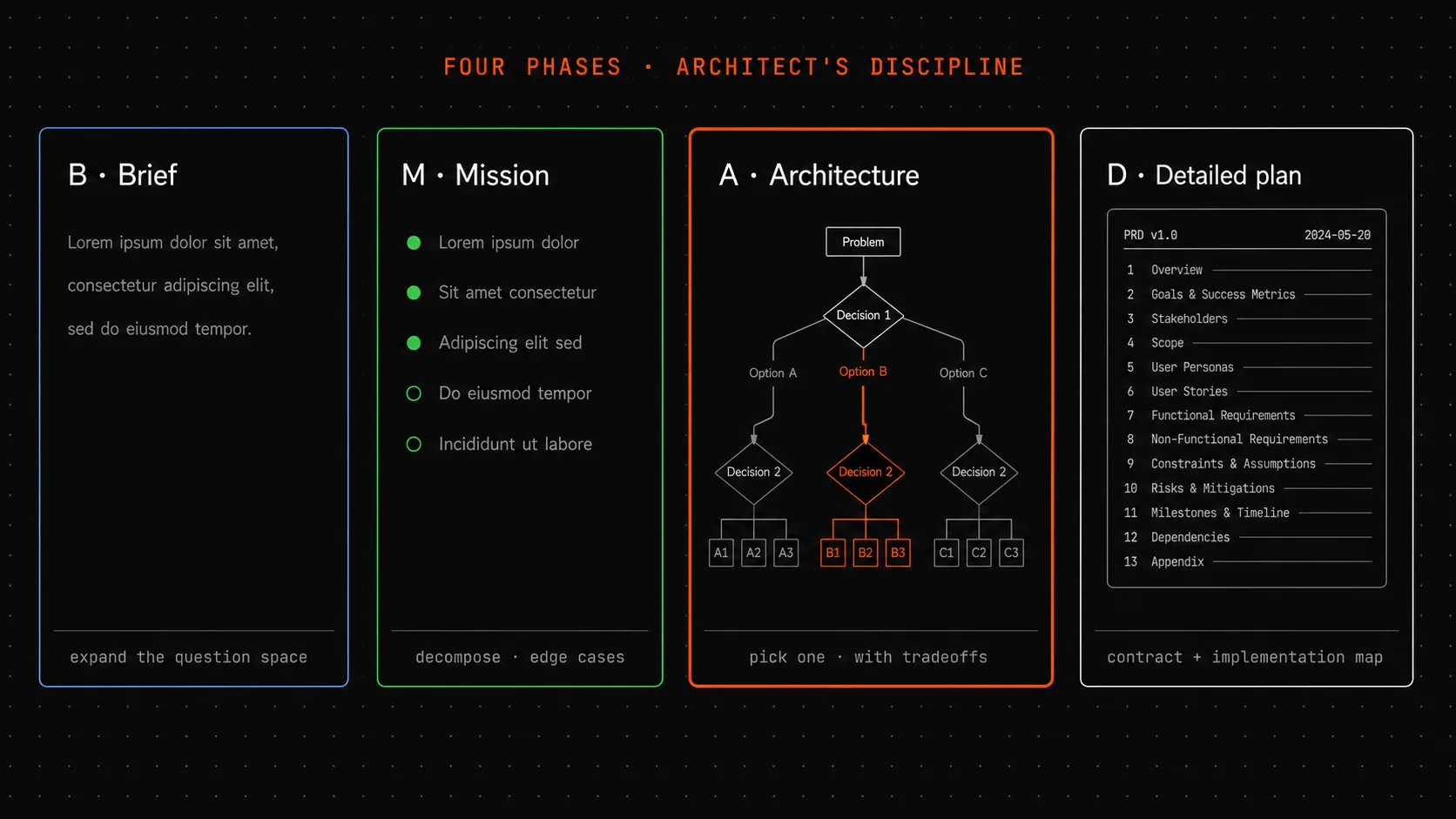
Between a one-line Slack message and a working feature there are four phases: expanding the solution space, breaking it into parts and edge cases, choosing an option, writing the contract document. The only question is whether a team runs these phases in a document in one day - or in code over two weeks of untangling consequences.
The architect analogy
An architect doesn’t start with blueprints. If they sit down to draw blueprints on day one - that’s a bad architect.
First comes the brief with the client: who will live there, what’s the budget, what are the neighbors like, what’s planned for the next ten years. That conversation can span several meetings and ends not with pictures but with text - a record of requirements.
Then the concept: how many floors, where’s the kitchen, where are the bedrooms, where’s the entry zone. Three or four options; one is chosen in conversation with the client. At this stage there are still no blueprints - only rough diagrams.
Then materials: reinforced concrete or glulam timber, what kind of windows, how to insulate. This is already an engineering choice with tradeoffs: cheaper but noisier; more expensive but warmer.
And only then - working blueprints for the crew that will actually build.
Skip any phase and you get either a house without a foundation (skipped the concept, went straight to blueprints), or a kitchen with no window (skipped the brief, didn’t account for how the family actually lives), or a bathroom above the neighbor’s bedroom (skipped materials selection and drainage planning).
Product development has the same four phases. The difference is that in building, running them is mandatory - you physically can’t lay a brick without a blueprint. In software, you can write code at any moment, and that creates the illusion that the phases are optional. They’re not - they happen regardless. The only question is whether they happen in a document in one day, or in code over two weeks of untangling consequences.
The same four phases for product features
For a feature you’re adding to a product, the four phases have simple names: expand, structure, choose, document.
Expanding the solution space. Input: one problem statement from a Slack message. Output: three or four ways to solve it, each with a brief list of pros and cons. This is the same “three versions” logic from the diagnostic post, applied at the product-decision level. This phase takes 30 minutes to an hour. The key is not letting your brain immediately lock onto the first obvious approach.
Structuring: breaking it into parts and edge cases. Take the chosen area and break it into components. What’s separate, what’s together. Which scenarios are the main path, which are edge cases. What happens when the user does the “wrong” thing. This phase catches 80% of future bugs at the document stage. One hour spent on edge cases saves ten hours of code.
Choosing an option with tradeoffs. From the three options in phase one, pick one. With clearly stated reasons for the choice and conditions under which the choice would have been different. This is the same logic as a DDR - just applied at the feature level rather than a single architectural decision.
The contract document. The final phase - a PRD (Product Requirements Document), a product document in 13 sections. What the team reads when they sit down to implement. What the stakeholder checks when they accept the work.
Four phases for a building takes months. For a feature - a day or two of a product manager’s work. But they must be run before code starts, otherwise the brick is already on an unprepared foundation.
A concrete example: “tags for notes”
Let me take a concrete case. A team is building a note-taking app (I’ll call it Vault). A requirement comes in: “add tags to notes.”
Without the four phases, the developer goes to write. First they add a tags column to the notes table, storing it as a JSON array of strings. Ships in two days. Two weeks later: “search notes by tag.” It turns out JSON search in the database is slow - need to refactor to a separate many-to-many table. Two more weeks. A month later: “delete a tag from all notes at once.” Another rebuild. Two months in, the “tags” feature has consumed four weeks of work instead of the original two-day estimate.
With the four phases, the same feature looks completely different.
Expand (30 minutes). Three options: tags as a JSON string array; a separate table with many-to-many; a hierarchical tag system with parents. Brief pros and cons for each.
Structure (one hour). Edge cases: what if the tag already exists? What if a tag is used across ten thousand notes and needs to be deleted? What if two users added the same tag with different capitalization (“Work” vs “work”)? What if a tag needs to be renamed? Immediately visible - the JSON option fails three out of four questions.
Choose (30 minutes). Pick option 2 (separate many-to-many table) with justification: the only one that holds up under search and bulk operations. The hierarchy (option 3) is deferred until demand is confirmed - it can be added as a layer on top, without rebuilding the foundation.
Document (one hour). A PRD with 13 sections. In the “not doing in MVP” section, explicitly: no tag colors, no hierarchy, no cross-device sync. Those four lines save the team from the “add tags” task blooming into a full tagging system two weeks later.
Total: three hours across four phases. Implementation: two days, no rebuilds. Two months later - the feature is stable, no emergency rework.
This is not theory. I’ve seen this difference play out on ten teams. Hours at the document stage are tens of hours at the code stage.
Thirteen PRD sections - this is not bureaucracy
A 13-section PRD is often perceived as “extra work that takes time away from engineers.” In reality it’s a pilot’s pre-flight checklist.
Before takeoff, the pilot runs through forty items. Not forty-one, not thirty-nine. Each item represents a failure mode that killed people in the past. Skip any one - the same thing can happen again. Forty items look like bureaucracy until you understand they’re a hundred years of collective aviation experience, measured in disasters.
A 13-section PRD is the same thing for product features. Each section is a question teams forgot in the past, and forgetting it cost them rework. “Let’s simplify to five sections” means bringing back eight known classes of mistakes.
The thirteen sections fall into three groups. The first (goal, audience, success metrics, scope) answers “why this at all.” The second (functional requirements, non-functional requirements, edge cases, design) answers “what exactly we’re building.” The third (risks, open questions, non-goals, plan) answers “what could go wrong.”
The third group is the least often filled in and the most important.
Three sections skipped by reflex
Three of the thirteen sections are skipped most often, and they’re exactly the ones that protect against scope creep.
Non-goals. What we explicitly are not doing in this feature, so the scope is clear. “Not supporting tag hierarchy in MVP. Not doing tag colors. Not syncing across devices.” Four lines. Without them, two weeks later the designer comes in with “let’s add colors, it’s the logical next step.” The team spends another week on colors. Then the stakeholder shows up with “tags need to sync on mobile too.” Two more weeks. The original “two days for tags” estimate turns into two months - not because of bad estimation, but because of scope creep.
Open questions. What is not clear right now and needs an answer before code starts. “Not resolved: maximum number of tags per note. Not resolved: do we support mixed-language tags in one field or keep them separate?” These questions will come up during implementation - better to surface them now and get an answer than to hit them mid-sprint and stall.
Risks. What could break on launch. “Risk: migrating existing notes to the new tag structure could take up to thirty minutes per user - we need either a phased rollout or a background migration plan.” The risk list is insurance against “we already shipped, now we’re patching production.”
Three sections. Ten to fifteen minutes to fill in. Effect - two or three weeks of saved work untangling what was left unsaid.
Who writes it, who reads it
A PRD is written by the product manager. Not the developer, not the designer, not the CEO. The developer can help with technical constraints, the designer with interface sketches - but ownership of the document is the product manager’s.
This matters because a PRD is a contract. The developer reads it and says “this is clear, I can start from this.” The designer reads it and says “I need three mockups here.” The stakeholder reads it and says “yes, this is what I wanted.”
If the developer wrote the PRD - it will be full of technical detail with no business context. If the stakeholder wrote it - no edge cases. If the designer wrote it - no numbers or metrics. One person responsible for the whole document is insurance against a document with holes.
An AI agent (BMAD - a method for structured document generation from context) drafts the first version of the PRD in a minute from the problem statement and project context. Input: “tags feature for a notes app” plus links to related features (search, filters, note organization). Output: a filled-in template with notes like “needs clarification here” and “metrics needed here.” The product manager’s job from there: fill in the gaps, cut the bloat, sharpen the vague.
Review in a clean session
The final step before approving a PRD - a review in a clean session.
Authors don’t catch their own blind spots. Not from laziness - it’s how perception works. When you wrote the document, you carried an internal context, and the phrases felt clear. Twenty minutes later that context is gone, and the same phrases become “readable two different ways.”
A regular proofread doesn’t fix this. What fixes it is a clean-session review - either by someone who wasn’t involved in the discussion, or with a fresh AI session with an explicit framing: “find at least three problems, don’t praise, don’t suggest improvements.”
A clean session turns up 5-7 issues. After filtering - 2-3 real edits. Twenty minutes of work - two or three bugs that never reach the code.
The framing matters: without it, an AI session defaults to “praise the document.” With the “adversary” framing, it looks for holes the way a good code reviewer does.
What to hand to the AI agent, what to keep for yourself
A BMAD agent handles the first PRD draft well: pull context from related documents, fill in the template, propose three options in the expansion phase. Work that takes a human an hour, the agent does in a minute.
Three manual quality checks belong to the human:
- Density of meaning. Every section should be free of filler. If you can cut five lines out of ten without losing anything - cut them.
- Measurability. Success metrics must be numbers with thresholds, not “improve the user experience.” “Activation conversion above 35% in the first week” is a metric. “Users will find it more convenient” is not.
- Implementation leaking into requirements. A PRD says “what,” not “how.” “Tag search in under 200ms” is a requirement. “Use PostgreSQL full-text search” is a solution - that goes in the RFC, not the PRD.
If AI fills the PRD 100% - you have a polished template with three problems a human should have caught.
What to read next
This is the fifth post in the series. Previous posts:
- The decision graveyard
- Before fixing - write three versions
- Averages lie
- The motivation section for an architectural decision
Coming next:
- How a spec differs from a PRD and why that gap matters enormously in practice.
- What it looks like when four methodologies are held in one plane.
This post comes with an interactive task-depth calculator: enter a short description of what you’re building and get a recommendation - “tactical” / “standard” / “deep” / “critical” - with an explanation of which records are needed. It lives at /guides.